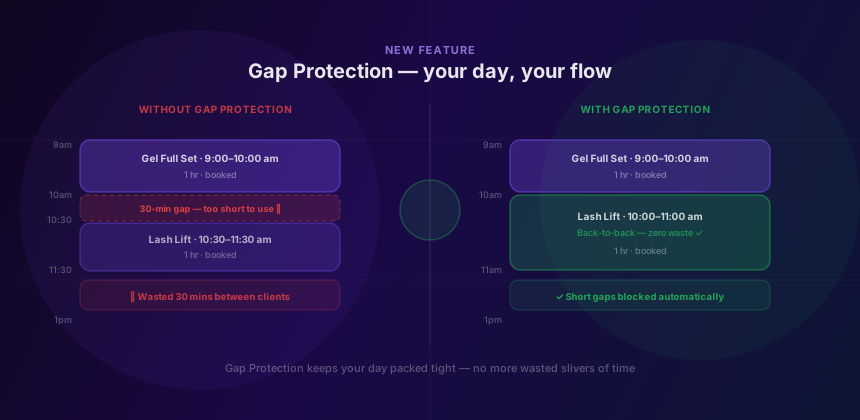
You've seen it happen. You have an appointment from 9 to 10. Someone books 10:30. That leaves a 30-minute gap you can't do much with — too short for another service, too long to just sit there. Your day ends up fragmented before it's even started.
Gap Protection fixes this. It's a new Glamly setting that prevents clients from booking times that would leave short, unusable gaps in your schedule. You set the minimum gap size you're comfortable with — and Glamly quietly enforces it on your booking page, without any friction for clients who book back-to-back or at a sensible distance.
The problem in practice
The 30-minute nowhere land
Gel full set 9–10am. Client books lash lift for 10:30. You're stuck with 30 minutes between — not enough to take another client, too early to prep. You lose the time to nothing.
Back-to-back, or properly spaced
10:30 is blocked because it creates a gap below your minimum. The client sees 10:00 (back-to-back) or 11:30 (full gap) as the next options. Your day stays tight.
How it works
Gap Protection lives in your booking rules settings. You set a minimum gap threshold — for example, 30 minutes. Glamly then checks every potential booking time against your existing calendar. If accepting a booking at that time would leave a gap of less than your minimum on either side, the slot is hidden from the client.
Back-to-back bookings are always allowed — a zero-minute gap between appointments is fine because there's no dead time. The rule only kicks in when there's a gap at all, and that gap falls below your threshold.
Simple to set up
Head to Dashboard → Settings → Booking Rules and look for the Gap Protection option. You'll find a dropdown to set your minimum gap size:
- Off — no restriction (default for existing accounts)
- 15 minutes — blocks gaps shorter than 15 min
- 30 minutes — recommended for most solo pros
- 45 minutes — good if you always need time to reset between clients
- 60 minutes — useful for longer, more involved services
What clients see
Nothing changes on the client side except the available times. They still see your normal booking page with your branding and services. Times that would create a protected gap simply aren't shown as options — there's no explanation, no error message, no friction.
For most clients this won't make any difference at all. The majority of bookings happen at the start of the day, straight after another appointment, or with a clearly intentional gap. Gap Protection only catches the edge case where someone inadvertently fragments your day.
Works with your existing rules
Gap Protection works alongside every other Glamly rule you already have set up:
- Processing time — gap calculation happens after processing time is factored in, so back-to-back multi-step appointments still work correctly.
- Lunch breaks and time-off — these count as natural boundaries and don't trigger gap protection. A booking right before your lunch is fine.
- Travel time (mobile pros) — travel buffers are respected. Gap Protection applies on top of travel time calculations, not instead of them.
- Out-of-hours bookings — gap rules apply to out-of-hours slots in the same way as regular hours.
If you run a hybrid setup — some services in-salon, some mobile — Gap Protection applies to each location type independently, since travel time already accounts for the spacing between them.
Who this is for
Gap Protection is most useful for pros who work alone, back-to-back, and whose day only works when it's tightly organised. If a 30-minute gap is genuinely usable for you — cleaning, admin, a break — you might prefer to leave it off or set a smaller threshold.
The setting is per-business and off by default, so nothing changes for anyone currently live on Glamly unless you actively turn it on. Try it, see how it affects your bookings over a week, and adjust the threshold from there.
A few things worth noting
- Gap Protection only applies to the public booking page — it doesn't restrict manual bookings you add yourself in the dashboard.
- If you already have an appointment that creates a gap (added manually), Gap Protection still applies to new bookings around it.
- The setting takes effect immediately — no need to republish or reset anything.
- Promote a Slot links are not affected — those already show only genuinely free start times.
Gap Protection is live now for all Glamly accounts. Find it in Settings → Booking Rules → Minimum gap between bookings.