Every beauty professional has been there. A cancellation comes in at 11am for a 2pm slot. You post something vague on your story. A few people message "how much?", "what's your availability?", "do you do [completely different service]?". You reply back and forth for 20 minutes and the slot is still empty.
That's not a social media problem — it's a friction problem. When booking requires a DM conversation, most people don't follow through. Promote a Slot removes that friction entirely.
How it works
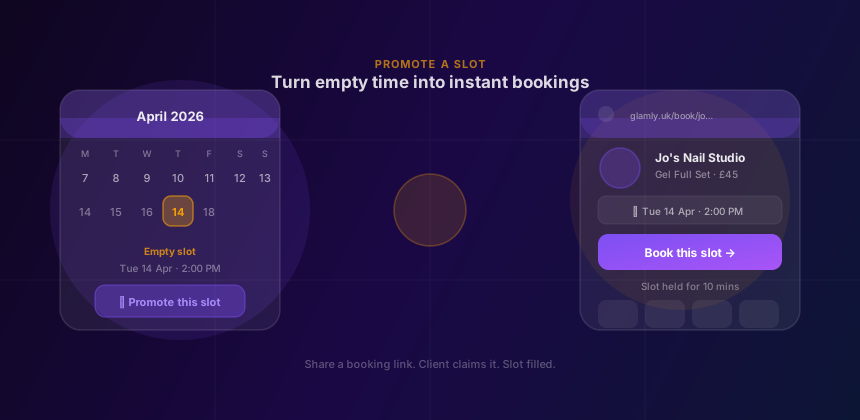
Promote a Slot is built into your Glamly dashboard. You pick a service and a date and time, and Glamly generates a unique booking link pre-loaded with that exact slot. No service picker, no calendar browsing — the client lands directly on a confirmation page for what you're promoting.
From there it works exactly like a normal booking: they enter their contact details, pay a deposit (or full payment, if that's how you have it set up), and the appointment is confirmed. The slot is held for 10 minutes from the moment they open the link — enough time to complete checkout without rushing.
Three ways to promote a slot
- Tap any empty slot in your day view calendar, then tap "Promote this slot" — date and time are pre-filled automatically.
- Press the + button in the calendar and choose "Promote a slot" — you pick the service, date, and time manually.
- From the bookings panel — the same option is available from your bookings view for any upcoming empty period.
Caption templates built in
Once the link is generated, Glamly gives you a ready-to-post caption to go with it. There are five templates to choose from depending on what you're posting and where:
Cancellation
For when someone drops out last-minute and you want to fill the gap fast. Direct, urgent, human.
Free spot
For a gap that just opened up — not necessarily a cancellation. Light and casual in tone.
Last chance
For when you're nearly fully booked and this is genuinely the last available slot this week.
IG — Cancellation & Free spot
Instagram-specific versions with hashtags and "link in bio" copy already included.
You can copy the caption with one tap, then share the link however works best for you — Instagram story, WhatsApp broadcast, Facebook group, your regular feed. The link works anywhere.
What the client sees
When a client taps your link they land on your normal Glamly booking page — your branding, your services, your deposit policy — but with the service and time already locked in. All they need to do is confirm their name, number, and pay.
If the slot has already been taken by the time they tap the link, they'll see a friendly message letting them know and a button to browse your full availability instead. You won't end up double-booked, and they won't end up confused.
Why this matters for your socials
Most beauty pros use Instagram or WhatsApp to fill last-minute slots — but the standard approach means fielding questions in DMs, repeating availability info, and hoping people follow through. Promote a Slot turns a passive post into an active booking link.
Your followers see a specific service, a specific time, and a direct path to book it. That specificity is what converts — "Gel full set, Tuesday 2pm, tap to book" gets far more action than "DM me for availability." You're removing every step between interest and appointment.
It's not a marketplace
When you share a Promote a Slot link, clients land on your booking page — not a platform page, not a search result, not a page showing five other professionals near them. They're booking directly with you. Your name, your service, your price.
That's the Glamly difference. The booking infrastructure works like a large platform, but the client relationship stays entirely yours.
A few things worth noting
- Slot links expire when the date and time has passed — so you don't need to worry about old links being misused.
- The slot is only held once the client opens the link — not when you generate it. You can make as many links as you like without blocking your calendar.
- If you've set up a deposit or full payment for the service, that applies to slot links too — so you're always protected.
- Any active promotions or discounts you've set up will be applied automatically on the booking page.
Promote a Slot is available to all Glamly users now — no extra settings required. Just tap any empty slot in your day view and you're one tap away from a shareable link.