
Black Friday lands on Friday 27 November this year, with Cyber Monday straight after on 30 November. Your clients will be scrolling for deals and Christmas presents all weekend, and a well-planned offer can fill quiet weeks you'd otherwise struggle with.
Done badly, though, Black Friday just gives money away on appointments you'd have got anyway. Here's how to plan a deal that actually works for your business, set it up in Glamly in a few minutes, and make sure your clients hear about it.
1. Decide what you want to fill
Before you pick a discount, look at your diary. December Saturdays are probably filling up on their own, so there's no need to discount those. The weeks that usually need help are:
- January, when everyone's skint after Christmas and diaries go quiet
- Weekday daytimes in early December
- Services you want to grow, like a new treatment or a course of appointments
Glamly lets you aim a promotion at exactly these. You can discount appointments taking place on certain dates (for example, any January appointment booked over the Black Friday weekend), not just bookings made that weekend.
2. Price a deal that still pays you
Every pound off comes straight out of your profit, not your takings. So before you post “30% off everything”, do a quick sum for your most popular service: the price, minus your products, minus what your time is worth. Then check the deal still leaves you happy.
You don't have to discount everything
- Pick a few services rather than your whole menu, ideally ones with lower product costs
- Set a new price on a hero service (e.g. lash lift & tint for £35) instead of a blanket percentage
- Discount the extras, so clients upgrade rather than pay less for what they'd book anyway
- Make it short: a weekend-only or 2-hour flash sale feels more exciting than a month-long offer
- Keep deposits on so deal-hunters still turn up
3. Set up your promotion in Glamly
Promotions are included in every Glamly plan. Your discounted prices show on your booking page with the original price crossed out, so clients can see exactly what they're saving.
- Go to Settings → Promotions and tap New Promotion.
- Give it a name and description clients will see, like “Black Friday weekend”.
- Choose your discount: one % off everything, a custom % per service, or a new price per service.
- Choose when it applies: to bookings made between your dates, or to appointments taking place on those dates.
- Set the start and end dates. Add a start and end time if you want a flash sale, for example Friday 6pm to 8pm.
- Optionally add a discount on extras, then tap Save Promotion.
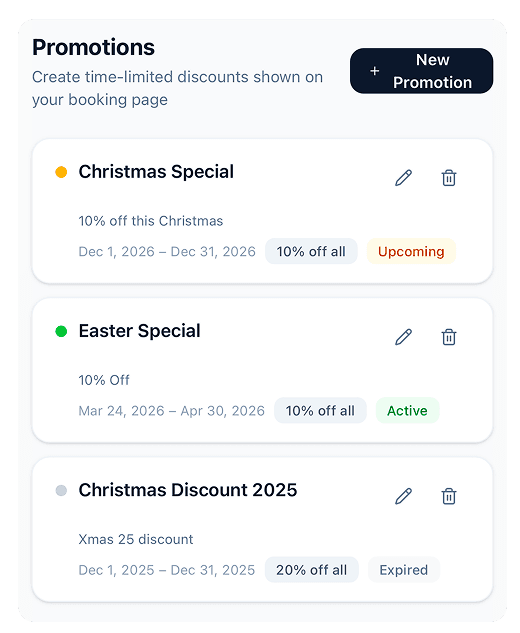
Your promotions list shows what's upcoming, active and finished.
It switches on and off by itself at the times you set, so you don't need to be at your phone at midnight.
4. Sell gift vouchers for Christmas
Black Friday is when lots of people start their Christmas shopping, and a voucher for their favourite salon is an easy present. Switch on Settings → Gift Vouchers and clients can buy them straight from your booking page. They can even pick the date it's sent, so it lands on Christmas morning.
Vouchers are paid up front, so that money is in your account before Christmas, and the appointments come in January when you need them most.
5. Tell your clients with Glamly Growth
A deal nobody sees doesn't fill your diary. Glamly Growth is our built-in marketing toolkit, and it's made for exactly this kind of weekend:
Campaigns
Send your offer to your clients by email or SMS. Pick who gets it and schedule it ahead, so it goes out at 7am on Friday while you're asleep.
Promo codes
Create a code like BLACKFRIDAY for Instagram or TikTok, with an expiry date, a minimum spend and a limit on how many times it can be used.
Win-back messages
Black Friday is the perfect excuse to get back in touch with clients you haven't seen for a while.
Free automations Free
Rebooking reminders, review requests and birthday messages keep running in the background, so new deal clients become regulars.
Glamly Growth is £10 a month with a 7-day free trial, so you can start it now and run your whole Black Friday campaign before you decide. Find it under Glamly Growth in your menu.
A simple plan for the weekend
- Monday 23rd: email a sneak peek so clients know something's coming
- Friday 27th, morning: your offer goes live, with an email and post on social
- Monday 30th: a “last chance” text for Cyber Monday
Keep it to that. Two emails and one text over a week is plenty; any more and clients start to switch off.
Your Black Friday checklist
✅ Work out a deal that still leaves you a profit
✅ Create it in Settings → Promotions
✅ Switch on Gift Vouchers for Christmas presents
✅ Schedule your Glamly Growth campaign and share your promo code
✅ Check your deposits are on
If you get stuck setting anything up, message us at hello@glamly.uk and we'll help. Good luck, we hope it's your busiest one yet! 🖤