Adding your booking page to your own website
Put your Glamly booking page on your own website so clients book without leaving it.
How to set it up
- Go to Settings → Integrations → Embed on your website.
- Copy the code.
- Paste it into your website where you want the booking page to show.
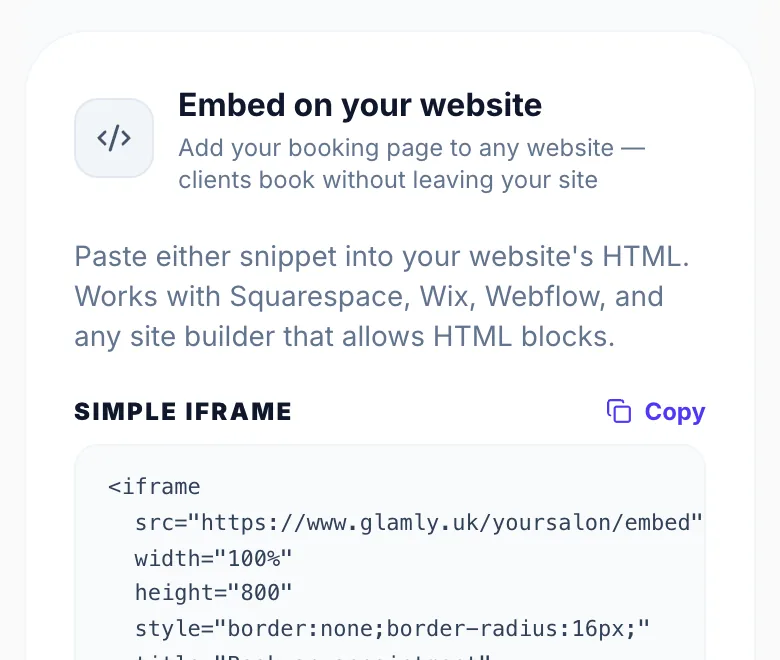
Which code to use
- Simple iframe: best for Squarespace, Wix and Webflow.
- Auto-resize script: best for custom-built sites. The booking page grows and shrinks to fit, so there's no scroll bar inside it.
Version 1.0 · Updated 17 Nov 2026
Was this helpful?
More in Integrations
See all- Syncing your bookings to your calendar appGlamly generates a private live feed of your appointments that any calendar app can subscribe to.
- How clients add their booking to their calendarAfter completing a booking on your public page, clients are shown calendar options directly on the confirmation screen — no extra steps needed.
Still stuck?
Message us and a real person will get back to you. If you're logged in, Settings → Contact Us is quickest.
Not on Glamly yet?
Bookings, deposits, reminders and payments in one app for beauty pros. Try it free for 30 days — no card needed.