Age verification and parental consent
Ask for a date of birth on chosen treatments, then either block under-age bookings or let them book with a parent or guardian's consent form. Handy for piercings, lash extensions or anything with an age limit.
Turning it on
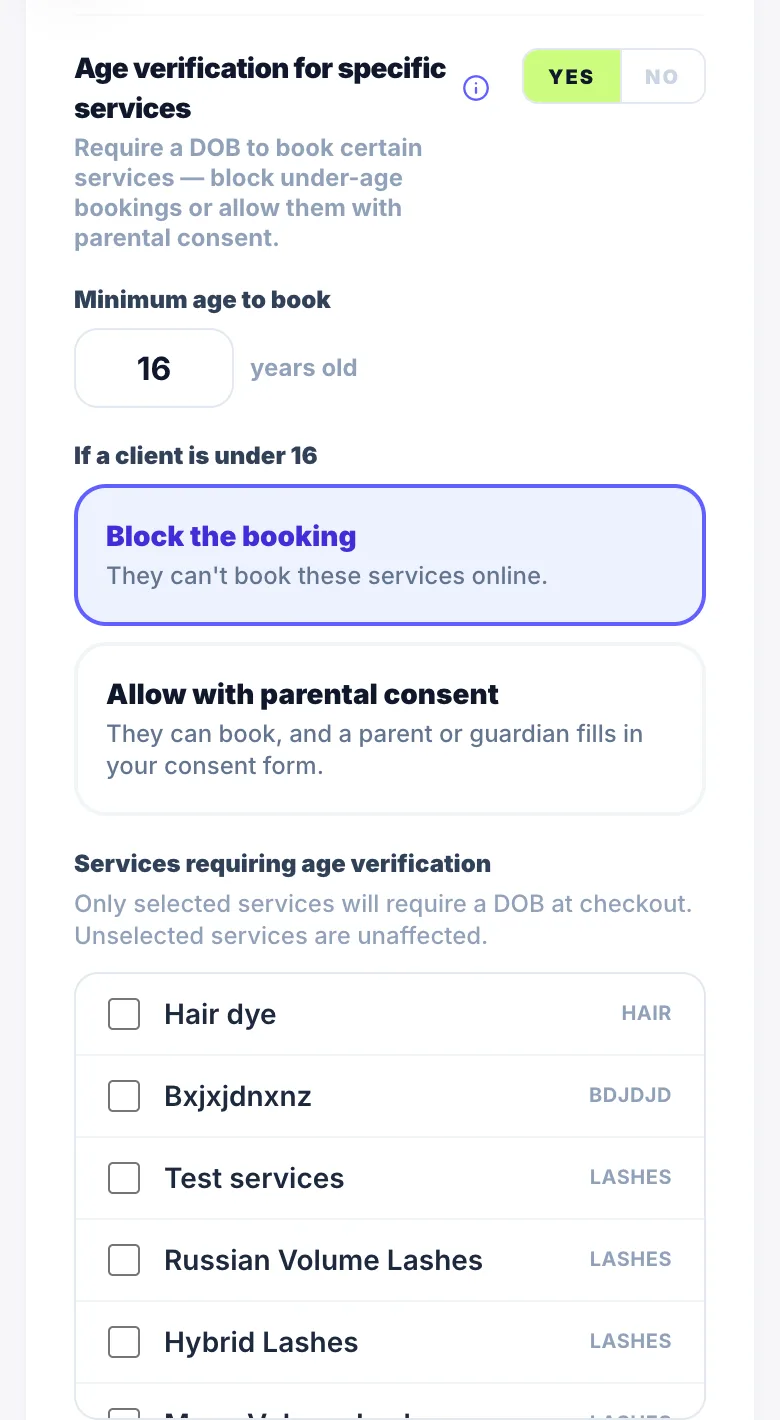
Go to Settings → Rules and switch on 'Age verification for specific services'. Then set:
- Minimum age to book (for example 16).
- If a client is under that age: Block the booking, or Allow with parental consent.
- Services requiring age verification: tick each treatment it applies to. If none are ticked, it won't apply to any bookings.
Allowing with parental consent
Choose your 'Parental consent form' from your consultation forms. Make one first in Settings → Consultation Forms, with a signature field for the parent or guardian. You can also set the 'Youngest age you treat', so anyone younger still can't book.
What the client sees
They're asked for their date of birth. If they're under your minimum age and you block, they see that they must be that age or over to book. If you allow with consent, they're told a parent or guardian will need to fill in a consent form, which they get once they've booked.
What you see
The consent form is added to the booking, and the booking's answers include 'Under 16 – parental consent needed: Yes – age 15' (with your minimum age and their age). The parent or guardian fills in and signs the form on the child's behalf.
Version 1.0 · Updated 22 Nov 2026
Was this helpful?
More in Consultation Forms
See all- Booking questionsAsk clients a few extra questions at checkout, like how they heard about you, and send a consultation form based on their answer.
- How clients complete the formClients are prompted to complete the form via the manage page link in their WhatsApp or email booking confirmation.
- Viewing form responses in the dashboardOnce a client completes their consultation form, all responses are visible in the booking detail panel.
- How often clients fill in a form (and re-confirmations)Every consultation form has a Re-request frequency that decides how often a client is asked to fill it in.
Still stuck?
Message us and a real person will get back to you. If you're logged in, Settings → Contact Us is quickest.
Not on Glamly yet?
Bookings, deposits, reminders and payments in one app for beauty pros. Try it free for 30 days — no card needed.