Cancelling every appointment on one day
Ill, closed or snowed in? Cancel all the day's appointments at once and every client is told why.
Turn it on first
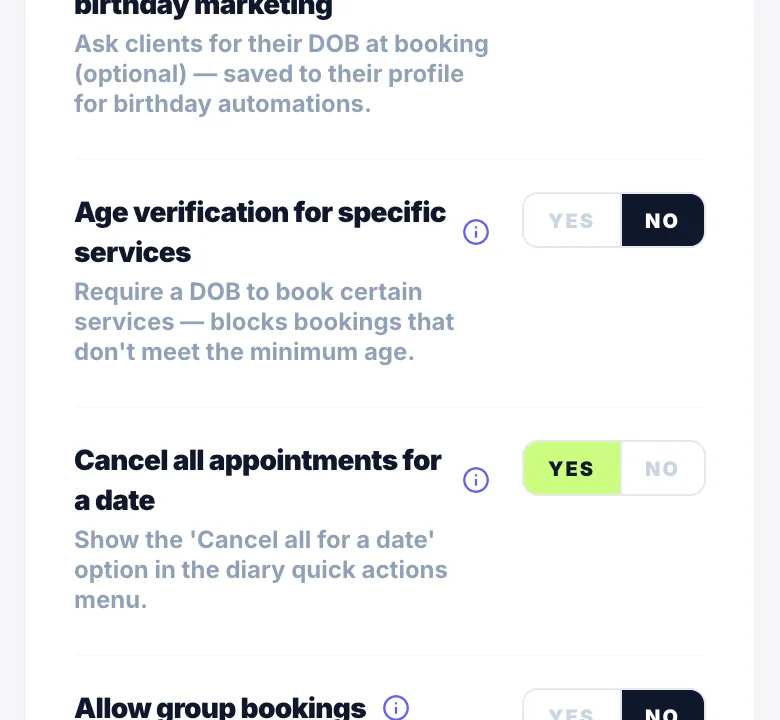
Go to Settings → Rules and turn on Cancel all appointments for a date. It's off by default so it can't be tapped by accident.
How to do it
- On your diary, tap the + quick actions button.
- Choose Cancel all for a date.
- Pick the date and type a reason. The reason goes in every client's cancellation message.
- Type 'cancel all' to confirm.
What happens
Every pending and confirmed appointment that day is cancelled and each client gets a cancellation message.
- Appointments with a paid deposit or full payment are skipped. Cancel those one by one so you can choose whether to refund.
Version 1.0 · Updated 17 Nov 2026
Was this helpful?
More in Cancellations & No-Shows
See all- How clients cancel a bookingClients cancel their booking using the manage link in their WhatsApp confirmation message — no need to contact you directly.
- How to cancel a booking as the businessYou can cancel any booking from your dashboard at any time.
- Setting a cancellation cutoffThe cancellation cutoff defines how many hours before an appointment a client can cancel and still receive a deposit refund.
- Late cancellations — retaining the depositIf a client cancels after your cutoff window, Glamly marks it as a late cancellation.
Still stuck?
Message us and a real person will get back to you. If you're logged in, Settings → Contact Us is quickest.
Not on Glamly yet?
Bookings, deposits, reminders and payments in one app for beauty pros. Try it free for 30 days — no card needed.