Changing the calendar time slot interval
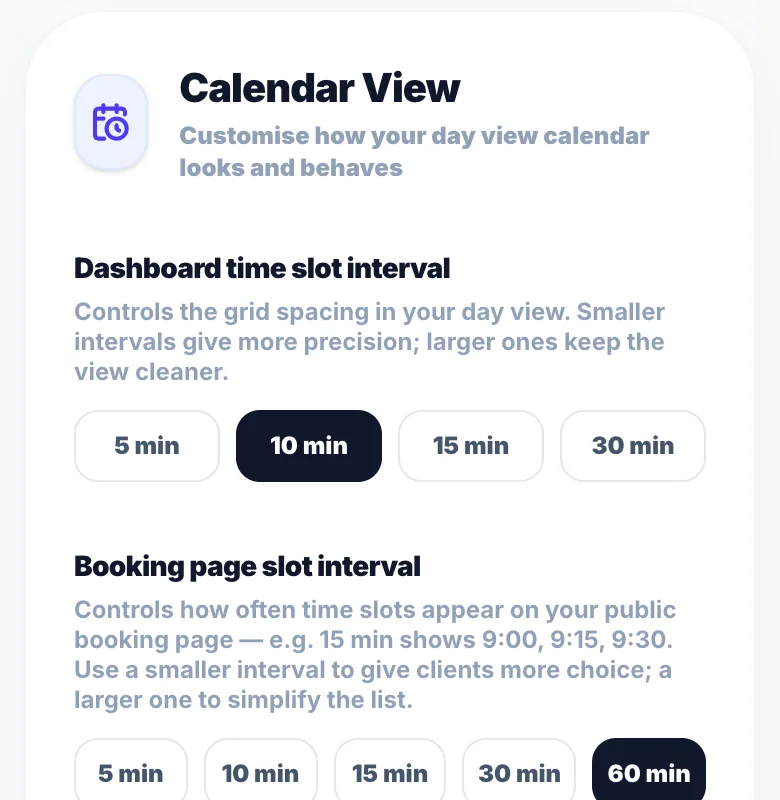
The day view calendar uses a grid interval you can change: 5, 10, 15 (default) or 30 minutes.
Where to change it
Go to Settings → Calendar View and choose a 'Dashboard time slot interval'. The change saves straight away.
Which interval to use
5 or 10 minutes: most precise, useful if you book at times like 9:10 or 9:25. 15 minutes: a good balance for most people. 30 minutes: the cleanest view if most appointments start on the half hour.
Tapping the calendar
When you tap a time in the day view to create an appointment, it snaps to the nearest interval.
Other calendar options
Settings → Calendar View also has the weekly grid view, the date strip and 'Jump to current time'.
Version 1.0 · Updated 17 Nov 2026
Was this helpful?
More in Bookings & Calendar
See all- Changing the booking page time slot intervalThe booking page slot interval controls which start times clients can choose online.
- Abandoned bookings — tracking and re-engagementAn abandoned booking is when a client starts booking, a time is held for them, but they don't finish.
- Creating recurring appointmentsRecurring appointments let you book a repeating series for a client in one go — perfect for regular colour clients, weekly blowdries, or monthly treatments.
- Managing a recurring seriesAfter a recurring series is created, you can manage it from the Recurring hub — accessible from the main Bookings Hub on your dashboard.
Still stuck?
Message us and a real person will get back to you. If you're logged in, Settings → Contact Us is quickest.
Not on Glamly yet?
Bookings, deposits, reminders and payments in one app for beauty pros. Try it free for 30 days — no card needed.