Setting up deposits
Deposits protect your time by making sure clients are committed before their appointment.
Turning deposits on
Go to Settings → Payments and turn on 'Request deposits'. You can set a deposit for the whole business there, or per service.
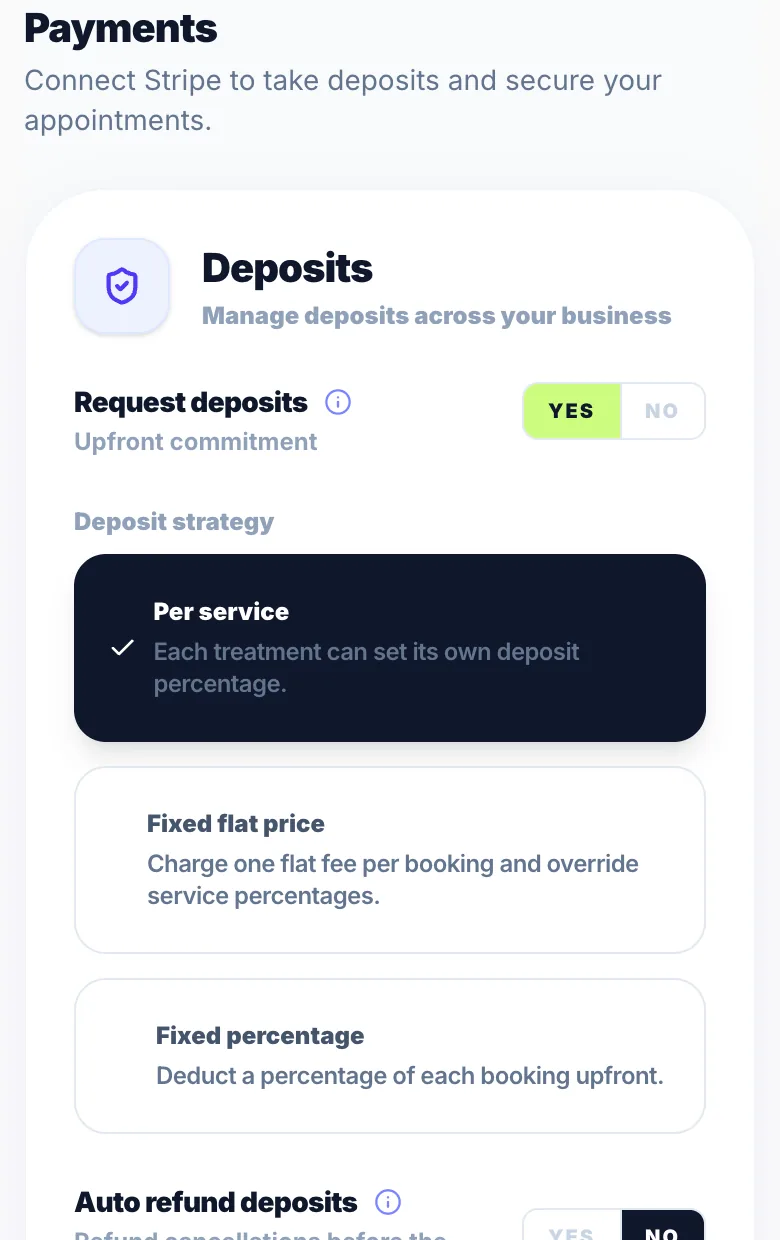
Per-service deposits
Open a service in Settings → Services Menu and turn on 'Require deposit?'. Choose a percentage (up to 75%) or a flat fee.
First-time clients only
In Settings → Payments you can ask for a deposit only from clients who haven't booked with you before.
No Glamly fee on deposits
Deposits carry no Glamly processing fee. Stripe's own card fee still applies.
Stripe required
Stripe needs to be connected before clients can pay deposits. See 'Stripe — accepting deposits and payments'.
Version 1.0 · Updated 17 Nov 2026
Was this helpful?
More in Deposits & Payments
See all- How deposits work for clientsWhen a client books a service that needs a deposit, they pay it by card before the booking is confirmed.
- Refunding a depositIf a booking is cancelled or a client is owed money back, you can issue a refund from the booking detail panel.
- Full payments — collecting the full amount upfrontFull payments let you collect the whole service price when the client books, instead of a deposit.
- Glamly's processing feeGlamly charges a 0.5% processing fee on card payments you take through Glamly.
Still stuck?
Message us and a real person will get back to you. If you're logged in, Settings → Contact Us is quickest.
Not on Glamly yet?
Bookings, deposits, reminders and payments in one app for beauty pros. Try it free for 30 days — no card needed.