Setting up gift vouchers
Gift vouchers let clients purchase a credit towards any booking. When enabled, a 'Buy a Gift Voucher' link appears on your public booking page and clients can buy and send vouchers directly.
Enabling vouchers
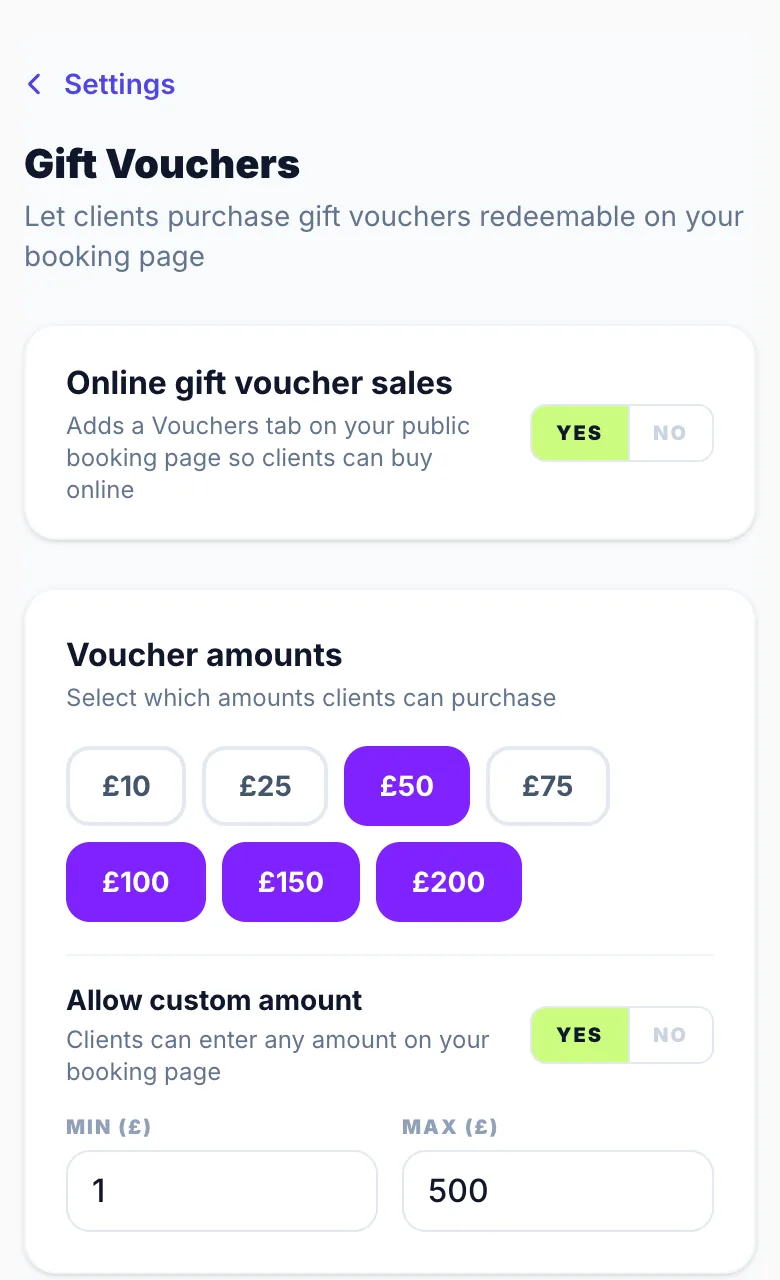
Go to Settings → Gift Vouchers and toggle 'Enable gift vouchers' on. Once enabled, configure your voucher amounts, expiry period, and any terms.
Voucher amounts
Choose from preset amounts (£10 to £200) and optionally enable a custom amount option so clients can enter any value within a minimum and maximum range you set.
Expiry
Set how many months a voucher remains valid after purchase. The default is 12 months. The expiry date is shown clearly in the voucher email and can be changed per voucher when issuing manually.
Terms note
Add an optional one-line terms note (e.g. 'Non-refundable. One voucher per booking.') that appears at the bottom of the voucher email.
Stripe requirement
Clients pay for vouchers via Stripe, so your Stripe account must be connected before vouchers can be purchased. Set up payments in Settings → Payments.
Version 1.0 · Updated 17 Nov 2026
Was this helpful?
More in Gift Vouchers
See all- How clients purchase and redeem vouchersClients purchase vouchers on your public gift page and receive a unique code by email.
- Sending a voucher on a chosen dateClients buying a voucher online can choose when it arrives, so it lands on a birthday or Christmas morning rather than the day they buy it.
- Issuing and managing vouchers manuallyYou can issue gift vouchers manually from the dashboard — useful for goodwill gestures, refunds, or gifts to loyal clients.
Still stuck?
Message us and a real person will get back to you. If you're logged in, Settings → Contact Us is quickest.
Not on Glamly yet?
Bookings, deposits, reminders and payments in one app for beauty pros. Try it free for 30 days — no card needed.