Patch tests: requirements, validity and warnings
Mark which treatments need a patch test, how long a test lasts and how far ahead it must be done, and choose whether clients without one can still book. Ideal for lash lifts, brow tints and hair colour.
Turning it on for a treatment
Go to Settings → Services Menu, open the treatment and switch on 'Requires a patch test?'. Then choose:
- Patch test valid for: 1, 3, 6, 12 or 24 months (6 to start with).
- Done at least: 24, 48 or 72 hours before the appointment (48 to start with).
- Stop online booking without one: off to start with.
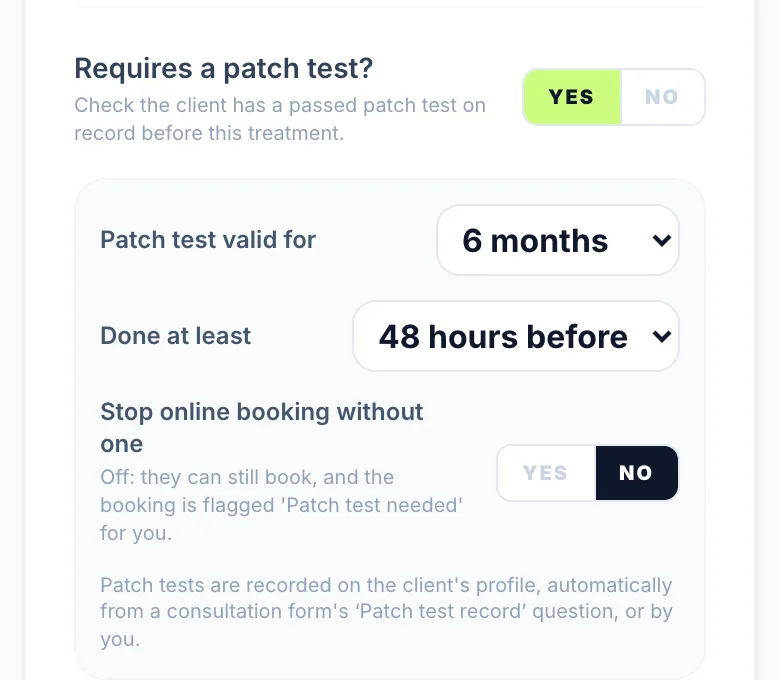
How long a test lasts
A test counts from the day it was done and lasts until the same date that many months later. Regular visits don't extend it, only a newer test does. A test recorded as Strong reaction or Fail never counts as valid.
Block, or allow and flag it
- With 'Stop online booking without one' on, a client without a valid test can't finish booking. They're told the treatment needs a patch test first and asked to book one or contact you.
- With it off, they can still book, and the booking is flagged 'Patch test needed' with the reason (for example 'Patch test is older than 6 months'). The client isn't shown a warning.
What you see
Bookings that need a test show an amber 'Patch test needed' banner. The new booking screen warns you too, but you can still book them in.
Recording a patch test
- On the client's profile, tap the patch test chip ('+ Patch test' if there isn't one yet), enter the date done and the result (Pass, Mild reaction, Strong reaction or Fail), and save.
- Or add a 'Patch test record' question to your consultation form. When a client answers with a newer date, their profile updates automatically.
Good to know
- Glamly doesn't email or message anyone when a test runs out. It shows on the booking instead.
- There's no automatic 'book a patch test' button for clients. If you offer patch tests as a service, mention it in the treatment's description.
- Your treatment's Important Information is separate, so only mention patch tests there if you want clients to read it before they choose.
Version 1.0 · Updated 22 Nov 2026
Was this helpful?
More in Consultation Forms
See all- Age verification and parental consentAsk for a date of birth on chosen treatments, then either block under-age bookings or let them book with a parent or guardian's consent form.
- Booking questionsAsk clients a few extra questions at checkout, like how they heard about you, and send a consultation form based on their answer.
- How clients complete the formClients are prompted to complete the form via the manage page link in their WhatsApp or email booking confirmation.
- Viewing form responses in the dashboardOnce a client completes their consultation form, all responses are visible in the booking detail panel.
Still stuck?
Message us and a real person will get back to you. If you're logged in, Settings → Contact Us is quickest.
Not on Glamly yet?
Bookings, deposits, reminders and payments in one app for beauty pros. Try it free for 30 days — no card needed.