No-shows will happen.
Glamly helps reduce them.
Your appointment diary is your income. Glamly gives you multiple layers of protection against no-shows and late cancellations — without the awkward conversations.
30-day free trial · No credit card required
An empty slot at 2pm
on a Tuesday.
A no-show is not just an inconvenience. It is lost revenue that cannot be recovered, a slot that cannot be rebooked at short notice, and time you could have spent on something else. The numbers add up quickly.
Figures are indicative. Your actual numbers depend on your business, services and client base.
Eight layers of
protection.
No-show protection is not a single feature — it is a system. Each layer addresses a different scenario, and they work best together. You choose which layers to enable for your business.
Deposits
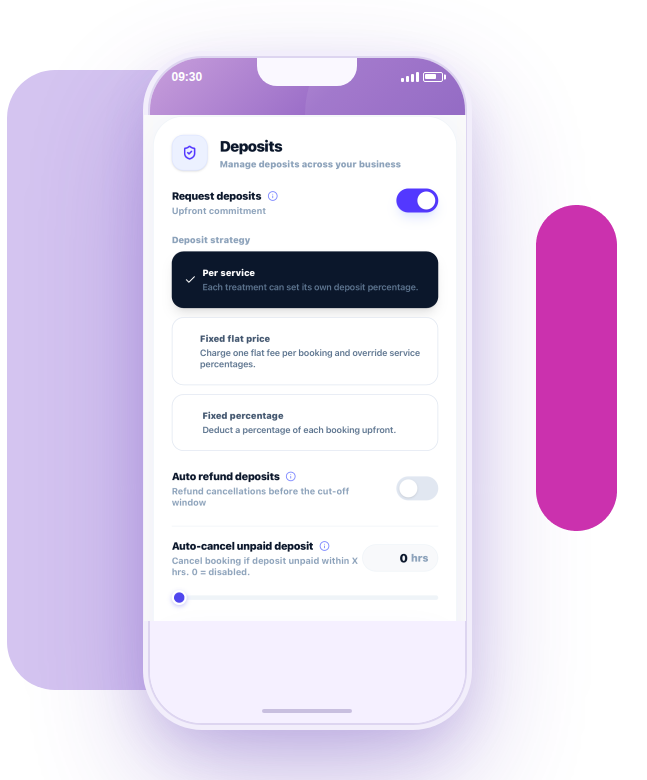
A client who has paid a deposit is far less likely to cancel or ghost. Require a fixed amount or percentage upfront — with zero Glamly platform fee. The most effective single change most beauty businesses can make.
Full payment upfront
For your highest-risk appointments or clients, collect the full service price at booking. There is no balance to chase and no financial loss if they don't arrive.
Card on file
Clients save a card when they book. It is not charged at the time — only if your cancellation policy is triggered. Glamly handles the Stripe card-saving securely. No card numbers are stored on Glamly's systems.
Automatic reminders
Most no-shows are not deliberate — they are forgotten appointments. Glamly sends automatic WhatsApp reminders 24 hours before and again 1 hour before every appointment. These alone can significantly reduce your no-show rate.
Cancellation policy
Set a minimum cancellation notice (e.g. 48 hours) and a fee (flat or percentage) that applies if a client cancels inside that window or does not show. Clients agree to the policy before they can complete a booking.
New-client protection
People who have never visited before carry a higher risk of not showing. Automatically require a deposit from any first-time client — without changing anything for your trusted regulars.
Per-client rules
Flag individual clients to always pay a deposit or the full amount, regardless of your general settings. Handled quietly within the booking flow — no awkward conversation needed.
Recovery messaging
When a client cancels or no-shows, Glamly's automation can send a follow-up message to help them rebook — before they go elsewhere. Recapture the lost appointment rather than just absorbing the gap.
Different clients need
different levels of trust.
A regular who's been coming for three years is not the same risk as a first-time client who found you on Instagram. Glamly lets you apply the right protection to each situation — without treating everyone the same.
Emma — 3 years, never missed a session
Emma books her BIAB infill every four weeks without fail. You know her, she knows you.
Sarah — first-time booking via Instagram
Sarah found your page on Instagram and wants to book a new lash set. You don't know her yet.
Jake — no-showed twice, late-cancelled once
Jake has cost you three empty slots in the last six months.
Your policy. Agreed
before they book.
Glamly's cancellation policy is shown to clients during booking and must be accepted before the appointment is confirmed. There are no surprises — the terms are clear from the start.
Minimum notice period
Set how far in advance a client must cancel to avoid a fee — 24 hours, 48 hours, or whatever works for your business.
Two-window policy
Set a warning window and a stricter window — for example, 48 hours at 25%, dropping to 50% inside 24 hours. Fair for clients, protective for you.
Card charge on file
If a client no-shows and they have a card saved, you can charge the fee directly from your dashboard. No chasing.
Agreed at booking
Clients must accept the policy before they can confirm. No grey area, no awkward conversation. The terms were clear from the start.
No-shows will happen.
Glamly helps reduce them.
No software eliminates no-shows entirely. People get ill, have emergencies, or sometimes just don't show up. What Glamly does is give you more control, more protection, and more options when it happens — so the financial impact is reduced and you are not left without recourse.
Every layer you add makes your business harder to take advantage of. The combination of deposits, reminders, a clear cancellation policy and per-client rules creates an environment where most clients take their appointments seriously.
Works best with.
Common questions.
Can I charge a client for a no-show?
Can I require deposits from new clients only?
Can clients save a card without paying immediately?
Can I set different cancellation windows?
What happens when a client repeatedly no-shows?
Do WhatsApp reminders actually reduce no-shows?
Ready to make running your beauty business easier?
Glamly brings your bookings, payments, clients and business tools together in one place — built specifically for beauty professionals.
30 days free · No credit card required